
Accounting & invoicing
Bankflow
Turn bank statements, invoices and receipts into categorized financial data ready to export
- Votes
- 0
- DR (Ahrefs)
- 17 +1 (up) since last check
Ahrefs Domain Rating reported 16 Oct 2026, restated 12 Oct 2026.
Bankflow metrics
Reported for bankflow.app: Ahrefs Domain Rating and Majestic link figures, with the movement since the prior report.
- Domain Rating
- 17
- +1 (up) since last check
- Trust Flow
- 20
- no change since last check
- Citation Flow
- 24
- no change since last check
- Referring domains
- 49
- no change since last check
- External backlinks
- 172
- no change since last check
Ahrefs Domain Rating reported 16 Oct 2026, restated 12 Oct 2026. Principal topic: Computers/Software/Operating Systems (20). Majestic reported 9 Oct 2026, restated 9 Oct 2026. Link figures sourced from Majestic. Trust Flow, Citation Flow and Topical Trust Flow are trademarks of Majestic-12 Ltd.
Bankflow domain summary
Read from the public RDAP record on 16 Oct 2026, 14:15 UTC.
- Domain age
- 5 months
- Registered
- Expires
- Registrar
- GoDaddy.com, LLC
- DNSSEC
- Not signed
AI-powered bank statement converter that extracts and categorizes transactions from PDFs, CSVs and images, then exports to accounting software in one click.
Overview
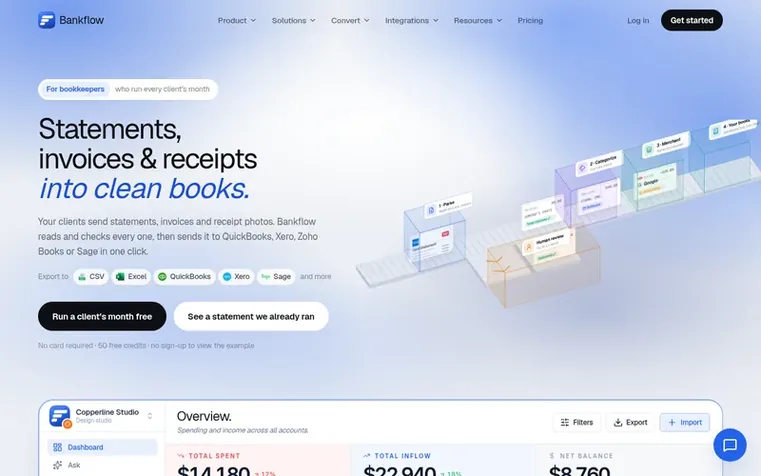
Bankflow reads bank statements, credit card statements, invoices and receipts—from PDFs, images, spreadsheets or email—and extracts every transaction with dates, amounts, vendors and line items. It automatically checks balances, categorizes spending, and identifies recurring charges. The result can be exported to Excel, CSV, JSON or directly into QuickBooks, Xero, Sage and other accounting software.
Designed for bookkeepers, accountants and accounting firms, each client gets a separate workspace where statements, categories and rules never mix. Rules created once run automatically on new imports, and every transaction stays reviewable before export. The platform includes merchant intelligence, cashflow forecasting, a profit-and-loss statement per client, and an AI query tool to ask questions about spending patterns.
Feature summary
- Drag-and-drop PDF, CSV, XLSX and JSON upload including scanned and password-protected files
- Automatic transaction extraction with dates, amounts, descriptions and vendor identification
- Statement balance verification and reconciliation checks
- Direct integration with QuickBooks, Xero, Sage and other accounting software
- Email forwarding import with automatic attachment capture
- Cashflow forecasting with runway projections and profit-and-loss statements
Pricing
Free: 50 credits one-time, 1 client workspace. Starter: $14.99/month, 300 credits monthly, unlimited client workspaces. Pro: $39.99/month, 1,000 credits monthly, unlimited client workspaces. Business: $99.99/month, 3,000 credits monthly, unlimited client workspaces. Top-up packs: 250 credits for $10
Q&A
- How are credits counted?
- One credit covers one standard A4 page, or one question in Ask. Oversized pages and dense scans cost more. A typical monthly bank statement uses only a few credits.
- What file formats can I upload?
- Bank and credit card statements as PDF, CSV, XLSX, or JSON, including scanned and password-protected PDFs, from a broad range of banks. Also invoices, receipts and loan statements as PDFs or photos.
- Can I keep each client separate?
- Yes. Give each client a workspace of their own: their statements, categories, rules and books never mix with another client's, and you switch between clients from the sidebar. One plan covers every workspace. Clients do not need a Bankflow account; they only forward statements to their workspace's import address or send you files the way they already do.
- Do I need to link my bank account?
- No, and you never will. Bankflow does not connect to your bank, ask for credentials, or use an aggregator. You upload only the files you choose, and you can delete them at any time.
- How accurate is the parsing?
- Dates, amounts, descriptions, balances, totals, vendors and line items are read from the document itself. Statement balances are checked where there is enough data, and every result stays reviewable and correctable before export.
Leave a review for Bankflow
No reviews of Bankflow yet. Open the first one. Reviews carry no fee and are never sold.
Bankflow has a free listing. The owner can unlock the full profile with a paid launch for $5:
- Founder story (locked)
- Milestones (locked)
- Demo video (locked)
- Dofollow website link (locked)
Comparables
| # | Sym | Name | Sector | DR chg | Votes |
|---|---|---|---|---|---|
| 1 | Number 1: CleverboekFree accounting software for freelancers and small businesses | Accounting & invoicing | 30 −1 (down) since last check | 1 votes. Log in to endorse Cleverboek | |
| 2 | Number 2: BookfolioUK accounting software for sole traders, landlords and limited companies with accountants on hand | Accounting & invoicing | 34 no change since last check | 0 votes. Log in to endorse Bookfolio | |
| 3 | Number 3: ChargdInvoicing software you buy once and own forever | Accounting & invoicing | 2 +1 (up) since last check | 0 votes. Log in to endorse Chargd | |
| 4 | Number 4: DevInvoiceFree invoice management software built for freelancers and developers | Accounting & invoicing | 0 no change since last check | 0 votes. Log in to endorse DevInvoice |