Accounting & invoicing
StatementToExcel
Convert bank statement PDFs to Excel or CSV in your browser with balance verification
- Votes
- 0
- DR (Ahrefs)
- 8 +6 (up) since last check
Ahrefs Domain Rating reported 16 Oct 2026, restated 9 Oct 2026.
StatementToExcel metrics
Reported for wattflow.net: Ahrefs Domain Rating and Majestic link figures, with the movement since the prior report.
- Domain Rating
- 8
- +6 (up) since last check
- Trust Flow
- 11
- no change since last check
- Citation Flow
- 15
- no change since last check
- Referring domains
- 25
- no change since last check
- External backlinks
- 33
- no change since last check
Ahrefs Domain Rating reported 16 Oct 2026, restated 9 Oct 2026. Principal topic: Regional/Asia (11). Majestic reported 7 Oct 2026, restated 7 Oct 2026. Link figures sourced from Majestic. Trust Flow, Citation Flow and Topical Trust Flow are trademarks of Majestic-12 Ltd.
StatementToExcel domain summary
Read from the public RDAP record on 16 Oct 2026, 14:22 UTC.
- Domain age
- 4 months
- Registered
- Expires
- Registrar
- Cloudflare, Inc.
- DNSSEC
- Not signed
A free, browser-based tool that converts text-based bank statement PDFs to Excel or CSV, verifying every row against the statement's running balance.
Overview
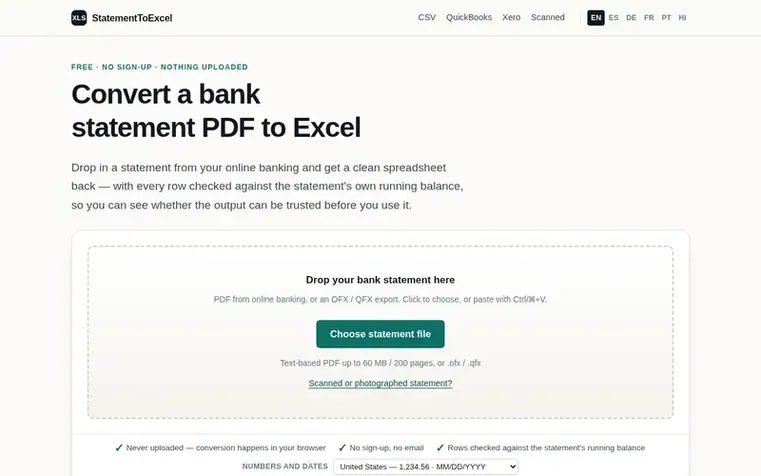
StatementToExcel converts text-based bank statement PDFs downloaded from online banking into Excel workbooks or CSV files. The tool reads the layout of the page, rebuilds the table from text positions, and verifies every row against the running balance the statement prints.
The conversion happens entirely in your browser using JavaScript—no upload endpoint, no storage, and no queue. This means your statement is never sent to a server and the tool keeps working offline after the page has loaded.
It supports multiple output formats including plain Excel and CSV, with presets for QuickBooks Online and Xero statement import. It also handles OFX and QFX exports from online banking. The tool is free with no sign-up, no row limit, and no watermark.
Feature summary
- Converts bank statement PDFs to Excel or CSV
- Runs entirely in browser with no upload
- Verifies every row against running balance
- QuickBooks Online export preset
- Xero statement import preset
- Supports OFX and QFX exports
- Handles up to 200 pages and 60 MB
- Detects encryption and password protection
- Includes raw transaction source text for traceability
- Flags rows that fail balance verification
Pricing
Pricing model: Free
Q&A
- Is my bank statement uploaded to a server?
- No. The PDF is opened and parsed by JavaScript running in your browser tab. There is no upload endpoint, no storage bucket and no queue. The tool keeps working offline after the page has loaded.
- How do I know the numbers are right?
- The converter checks its own work by verifying that each previous balance plus the row amount equals the next balance. Rows that do not reconcile are flagged in the preview and in the Notes column instead of being silently included.
- Can I import the result into QuickBooks or Xero?
- Yes. There are presets for QuickBooks Online (Date, Description, Amount with outflows negative) and for Xero statement import (*Date, *Amount, Payee, Description, Reference). Date order is a choice depending on your locale.
- Is it free?
- Yes. There is no sign-up, no row limit and no watermark. The site is funded by advertising and by referrals to OCR services.
- What if my statement is password protected?
- Most banks send encrypted PDFs. The tool detects the encryption and asks for the password, which is used in your browser only. Typical bank passwords are your date of birth, your account number, or the last four digits of your card.
Leave a review for StatementToExcel
No reviews of StatementToExcel yet. Open the first one. Reviews carry no fee and are never sold.
StatementToExcel has a free listing. The owner can unlock the full profile with a paid launch for $5:
- Founder story (locked)
- Milestones (locked)
- Demo video (locked)
- Dofollow website link (locked)
Comparables
| # | Sym | Name | Sector | DR chg | Votes |
|---|---|---|---|---|---|
| 1 | Number 1: CleverboekFree accounting software for freelancers and small businesses | Accounting & invoicing | 30 −1 (down) since last check | 1 votes. Log in to endorse Cleverboek | |
| 2 | Number 2: BookfolioUK accounting software for sole traders, landlords and limited companies with accountants on hand | Accounting & invoicing | 34 no change since last check | 0 votes. Log in to endorse Bookfolio | |
| 3 | Number 3: ChargdInvoicing software you buy once and own forever | Accounting & invoicing | 2 +1 (up) since last check | 0 votes. Log in to endorse Chargd | |
| 4 | Number 4: DevInvoiceFree invoice management software built for freelancers and developers | Accounting & invoicing | 0 no change since last check | 0 votes. Log in to endorse DevInvoice |