Accounting & invoicing
CleanStmt
Convert bank statements to Excel, CSV, or QIF with AI OCR
- Votes
- 0
- DR (Ahrefs)
- 11 no change since last check
Ahrefs Domain Rating reported 28 Oct 2026, restated 25 Oct 2026.
AI-powered bank statement converter that extracts structured financial data from PDFs, scans, and screenshots into Excel, CSV, and accounting formats with no
Overview
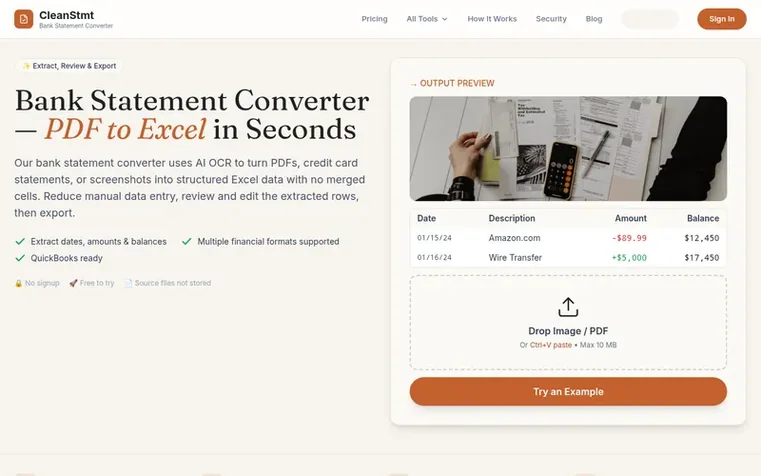
CleanStmt helps accountants, bookkeepers, and small business owners convert bank statement PDFs and scans into clean, structured spreadsheet data. The tool uses AI OCR to extract transaction dates, descriptions, amounts, and balances into separate rows that are ready for review, editing, and export. Users can upload native PDFs, scanned documents, or phone screenshots, then download results in multiple formats including Excel, CSV, Word, and accounting software formats like QIF, OFX, and QBO. The platform offers both single-file conversion for individual statements and batch processing to handle up to 10 text-based PDFs at once, with results organized in a date-sorted transaction summary and separate worksheets for each source document.
Feature summary
- Single-file OCR for PDFs, scans, and screenshots
- Review and edit extracted rows before export
- Batch processing for up to 10 text-based PDFs
- Multiple export formats including Excel, CSV, QIF, QBO, OFX
- No merged cells in Excel exports
- Date-sorted transaction summary with source tracking
- 7-day result history with paid plans
Pricing
Pricing model: Freemium
Free: 2 pages/day without signup, 6 pages/day with account. Starter: $19/month for 500 pages/month. Professional: $39/month for 1,200 pages/month. Business: $79/month for 3,000 pages/month. Page credits available: 300 pages for $19, 700 pages for $39, 1,500 pages for $69 (12-month validity).
CleanStmt metrics
Reported for cleanstmt.com: Ahrefs Domain Rating and Majestic link figures, with the movement since the prior report.
- Domain Rating
- 11
- no change since last check
- Trust Flow
- 8
- no change since last check
- Citation Flow
- 26
- no change since last check
- Referring domains
- 41
- no change since last check
- External backlinks
- 210
- no change since last check
Ahrefs Domain Rating reported 28 Oct 2026, restated 25 Oct 2026. Principal topic: Computers/Internet/On the Web (7). Majestic reported 25 Oct 2026, restated 25 Oct 2026. Link figures sourced from Majestic. Trust Flow, Citation Flow and Topical Trust Flow are trademarks of Majestic-12 Ltd.
CleanStmt domain summary
Show the domain summary
Read from the public RDAP record on 26 Oct 2026, 20:14 UTC.
- Domain age
- 8 months
- Registered
- Expires
- Registrar
- Cloudflare, Inc.
- DNSSEC
- Not signed
Q&A
- What is a bank statement converter?
- A bank statement converter turns a PDF, scan, or screenshot into structured financial data such as Excel, CSV, QIF, or QBO. CleanStmt uses AI OCR to extract transaction dates, descriptions, debits, credits, and balances into separate rows.
- Is the bank statement converter free?
- CleanStmt has a free starting tier. Anonymous users can convert up to 2 pages per day, and signed-in free users can convert up to 6 pages per day. Paid access is available for higher-volume workflows.
- What formats can I export to?
- A single result supports Excel (.xlsx), CSV, Word, and accounting formats such as QIF, OFX, and QBO. Batch conversion offers individual Excel files, a ZIP, or one merged workbook with a date-sorted transaction summary followed by one worksheet per successful PDF.
- Can I convert scanned or photographed bank statements?
- Yes. In Single mode, CleanStmt accepts native or scanned PDFs, screenshots, and JPG or PNG photos. OCR results depend on document clarity and layout; you should review unclear or missing values against the original. Batch conversion accepts text-based PDFs only, not scans or images.
- Which banks are supported?
- CleanStmt has dedicated pages for many popular banks, and the converter can work with other statement layouts because it reads the document itself rather than relying only on a fixed bank template. Review the extracted table before exporting.
Leave a review for CleanStmt
No reviews of CleanStmt yet. Open the first one. Reviews carry no fee and are never sold.
CleanStmt has a free listing. The owner can unlock the full profile with a paid launch for $5:
- Founder story (locked)
- Milestones (locked)
- Demo video (locked)
- Dofollow website link (locked)
Comparables
| # | Sym | Name | Sector | DR chg | Votes |
|---|---|---|---|---|---|
| 1 | Number 1: CleverboekFree accounting software for freelancers and small businesses | Accounting & invoicing | 30 −1 (down) since last check | 1 votes. Log in to endorse Cleverboek | |
| 2 | Number 2: TallyClipConvert PDF bank statements into structured transaction data for Excel, CSV, or QuickBooks import | Accounting & invoicing | 0 no change since last check | 0 votes. Log in to endorse TallyClip | |
| 3 | Number 3: Pocket AccountantAI bookkeeping for freelancers and small businesses | Accounting & invoicing | 3 +1 (up) since last check | 0 votes. Log in to endorse Pocket Accountant | |
| 4 | Number 4: TruewindAI agents that automate accounting close work | Accounting & invoicing | 48 +1 (up) since last check | 0 votes. Log in to endorse Truewind |