Accounting & invoicing
TallyClip
Convert PDF bank statements into structured transaction data for Excel, CSV, or QuickBooks import
- Votes
- 0
- DR (Ahrefs)
- 0 no change since last check
Ahrefs Domain Rating reported 28 Oct 2026, restated 28 Oct 2026.
A bank statement converter that extracts transactions from PDF statements and exports them as Excel, CSV, or accounting files for review and import.
Overview
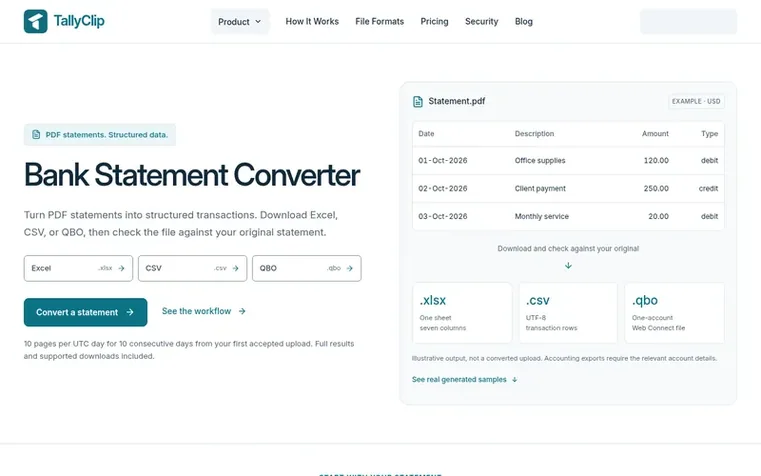
TallyClip converts PDF bank statements into structured transaction data that you can download and review before importing. It extracts dates, descriptions, amounts, and available balances from digital PDFs and readable English scans, offering multiple export formats: Excel workbooks with formatted cells, UTF-8 CSV files for import workflows, and QBO files for QuickBooks compatibility.
The tool includes available balance checks to verify transaction totals against printed opening and closing balances. Converted files use a consistent seven-column structure: Date, Description, Reference, Amount, Type, Balance, and Computed Balance. Users can process statements for free (10 pages per UTC day for 10 consecutive days), then choose from monthly or annual paid plans ranging from 500 to 5,000 pages per month.
TallyClip supports readable English scanned PDFs through OCR, requires no bank login, and allows batch uploads with merged downloads for registered users. All files remain in your private workspace, and you retain your original statement for verification.
Feature summary
- Excel export with formatted transactions sheet
- CSV export with UTF-8 text output
- QBO Web Connect file export for QuickBooks
- OCR support for readable English scanned PDFs
- Available balance verification checks
- Batch uploads with merged downloads
- Support for multiple export formats
- Private file storage in workspace
- Direct downloads without confirmation step
Pricing
Free: 10 pages per UTC day for 10 consecutive days. Starter: $14.50/month or $174/year (500 pages/month). Business: $24.50/month or $294/year (1,500 pages/month). Enterprise: $44.50/month or $534/year (5,000 pages/month). Annual plans save 50%.
TallyClip metrics
Reported for tallyclip.com: Ahrefs Domain Rating and Majestic link figures, with the movement since the prior report.
- Domain Rating
- 0
- no change since last check
- Trust Flow
- 0
- no change since last check
- Citation Flow
- 0
- no change since last check
- Referring domains
- 0
- no change since last check
- External backlinks
- 0
- no change since last check
Ahrefs Domain Rating reported 28 Oct 2026, restated 28 Oct 2026. Majestic reported 28 Oct 2026, restated 28 Oct 2026. Link figures sourced from Majestic. Trust Flow, Citation Flow and Topical Trust Flow are trademarks of Majestic-12 Ltd.
TallyClip domain summary
Show the domain summary
Read from the public RDAP record on 28 Oct 2026, 14:50 UTC.
- Domain age
- 19 days
- Registered
- Expires
- Registrar
- Spaceship, Inc.
- DNSSEC
- Not signed
Q&A
- What can a bank statement converter do?
- A bank statement converter extracts transaction information from a statement into structured rows you can review and use in another tool. TallyClip extracts dates, descriptions, amounts, and available balances from PDFs and offers spreadsheet and accounting-file downloads.
- Which export formats are supported?
- TallyClip supports Excel (.xlsx), CSV, QBO, QFX, QIF, and IIF exports. Excel and generic CSV can combine selected completed statements. Accounting formats have their own account, currency, and field requirements.
- Does it work for scanned bank statements?
- Readable English scanned PDFs are supported through OCR without needing separate OCR preprocessing. However, low resolution, skew, handwriting, or unclear text can reduce extraction quality, so you should compare the downloaded rows with your original.
- How accurate is the conversion?
- TallyClip has not published a measured field-level accuracy rate. You should compare the downloaded rows with the original statement and investigate any processing warnings. Balance checks can help identify differences when printed balances are available.
- What is included in free access?
- Guests and free accounts can process up to 10 pages per UTC day for 10 consecutive days from the first accepted upload. Usage resets at 00:00 UTC. Full results and supported downloads are included, with no separate confirmation step. Completed files within the allowance remain downloadable while free access is active. After the free period ends, a paid plan is needed to process or download files. Document retention also applies.
Leave a review for TallyClip
No reviews of TallyClip yet. Open the first one. Reviews carry no fee and are never sold.
TallyClip has a free listing. The owner can unlock the full profile with a paid launch for $5:
- Founder story (locked)
- Milestones (locked)
- Demo video (locked)
- Dofollow website link (locked)
Comparables
| # | Sym | Name | Sector | DR chg | Votes |
|---|---|---|---|---|---|
| 1 | Number 1: CleverboekFree accounting software for freelancers and small businesses | Accounting & invoicing | 30 −1 (down) since last check | 1 votes. Log in to endorse Cleverboek | |
| 2 | Number 2: Pocket AccountantAI bookkeeping for freelancers and small businesses | Accounting & invoicing | 2 −1 (down) since last check | 0 votes. Log in to endorse Pocket Accountant | |
| 3 | Number 3: TruewindAI agents that automate accounting close work | Accounting & invoicing | 48 +1 (up) since last check | 0 votes. Log in to endorse Truewind | |
| 4 | Number 4: Fele-factureSwiss invoicing app for freelancers and SMEs by voice or photo | Accounting & invoicing | 1 no change since last check | 0 votes. Log in to endorse Fele-facture |