
Accounting & invoicing
GetBankCSV
Bank statement converter that shows its arithmetic: PDF to CSV, Excel, QBO, OFX and QIF, balance-checked
- Votes
- 0
- DR (Ahrefs)
- 2 no change since last check
Ahrefs Domain Rating reported 28 Oct 2026, restated 25 Oct 2026.
Convert PDF bank statements to multiple formats with balance checking and reconciliation verification before payment.
Overview
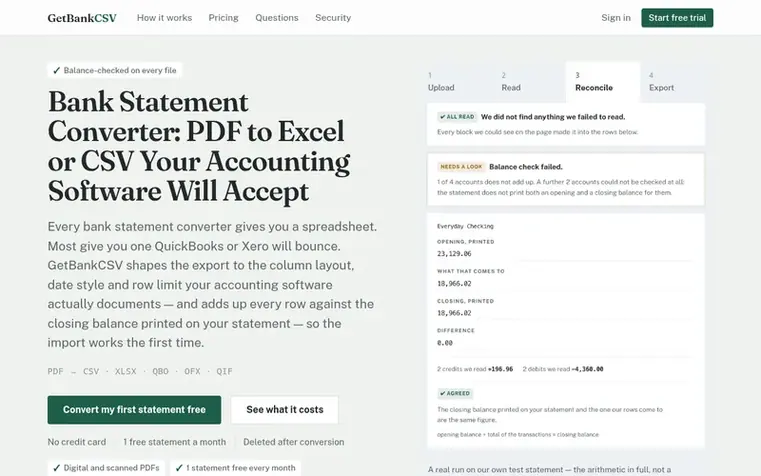
GetBankCSV converts PDF bank statements into structured spreadsheet data in multiple formats: CSV, XLSX, QBO, OFX, and QIF. The tool reads each transaction line including date, description, debit, credit, and running balance, then shapes the export to match the column layout, date style, and row limits that accounting software like QuickBooks Online and Xero actually require.
Every conversion includes a free balance check that compares the opening balance plus all transactions read against the closing balance printed on the statement, ensuring accuracy before payment. The tool also reports any parts of the document that could not be read, either by page or within the downloaded file.
Users can preview the first 10 rows, the balance check result, and any unread content notifications for free before purchasing. The converter handles both digital PDFs from online banking and scanned or photographed paper statements through OCR. Files are deleted within 24 hours of conversion.
Feature summary
- Converts PDF bank statements to CSV, XLSX, QIF, OFX and QBO formats
- Balance checking that compares opening balance plus transactions against closing balance printed on statement
- Reports unread content and document blocks that could not be extracted
- Splits multi-account statements into one table per account
- Handles scanned statements and image-only PDFs with OCR
- Destination-specific formatting for QuickBooks Online and Xero
- Free preview showing first 10 rows and balance check before payment
- Password-protected PDF support
- Handles up to 12 statements at once, up to 25 MB and 40 pages each
- Money-back guarantee if balance does not reconcile or document blocks are missed
Pricing
Pricing model: Freemium
Free: 1 statement per month (up to 10 pages). Single Statement: $5 USD one time (1 statement). Five Statements: $9 USD one time (5 statements). Starter: $19.99 USD per month (100 pages per month). Pro: $29.99 USD per month (200 pages per month). All paid plans include all five formats and balance ch
GetBankCSV metrics
Reported for getbankcsv.com: Ahrefs Domain Rating and Majestic link figures, with the movement since the prior report.
- Domain Rating
- 2
- no change since last check
- Trust Flow
- 9
- no change since last check
- Citation Flow
- 25
- no change since last check
- Referring domains
- 30
- no change since last check
- External backlinks
- 159
- no change since last check
Ahrefs Domain Rating reported 28 Oct 2026, restated 25 Oct 2026. Principal topic: Computers/Internet/Web Design and Development (9). Majestic reported 25 Oct 2026, restated 25 Oct 2026. Link figures sourced from Majestic. Trust Flow, Citation Flow and Topical Trust Flow are trademarks of Majestic-12 Ltd.
GetBankCSV domain summary
Show the domain summary
Read from the public RDAP record on 28 Oct 2026, 11:44 UTC.
- Domain age
- 2 months
- Registered
- Expires
- Registrar
- DropCatch.com 993 LLC
- DNSSEC
- Not signed
Q&A
- How accurate is it?
- GetBankCSV does not publish a single accuracy percentage because a number on test files tells nothing about your specific file. Instead, it shows you for free before payment whether the conversion worked by comparing every account's opening balance plus transactions read against the closing balance printed on your statement, and reporting anything in the document that could not be read by page.
- Which banks do you support?
- GetBankCSV has no supported-banks gate because there are no per-bank templates. It reads the document in front of you rather than matching it against a pre-built layout, so statements from any institution work the same way. The 24 institutions in regression tests represent what is tested against, not a list of what works. Upload one free statement and check the balance result for your bank.
- Does it work with scanned statements and image-only PDFs?
- Yes. When part of a page is a picture with no text behind it, the converter reads that block on its own machine first and sends it to be read again properly if it turns out to contain figures. Blocks that are logos or barcodes are passed over without issues. If something in an image block still cannot be accounted for, that is reported.
- Can I see what I am buying before I pay?
- Yes. Every conversion shows you the first rows, the balance-check result, and any part of the document that could not be read before any payment. Nothing about the quality of the conversion is hidden behind payment; only the full file is locked behind payment.
- What if the conversion is wrong?
- You get your money back. The guarantee covers both failure modes: when the balance does not close, and when a block of the document never made it into the output. The second case is important because when a whole block is missing, the remaining numbers still add up perfectly, so a balance check alone would miss it.
Leave a review for GetBankCSV
No reviews of GetBankCSV yet. Open the first one. Reviews carry no fee and are never sold.
GetBankCSV has a free listing. The owner can unlock the full profile with a paid launch for $5:
- Founder story (locked)
- Milestones (locked)
- Demo video (locked)
- Dofollow website link (locked)
Comparables
| # | Sym | Name | Sector | DR chg | Votes |
|---|---|---|---|---|---|
| 1 | Number 1: CleverboekFree accounting software for freelancers and small businesses | Accounting & invoicing | 30 −1 (down) since last check | 1 votes. Log in to endorse Cleverboek | |
| 2 | Number 2: TallyClipConvert PDF bank statements into structured transaction data for Excel, CSV, or QuickBooks import | Accounting & invoicing | 0 no change since last check | 0 votes. Log in to endorse TallyClip | |
| 3 | Number 3: Pocket AccountantAI bookkeeping for freelancers and small businesses | Accounting & invoicing | 3 +1 (up) since last check | 0 votes. Log in to endorse Pocket Accountant | |
| 4 | Number 4: TruewindAI agents that automate accounting close work | Accounting & invoicing | 48 +1 (up) since last check | 0 votes. Log in to endorse Truewind |