
Accounting & invoicing
PDF to QBO Converter
Convert bank statements from PDF into QuickBooks Online format
- Votes
- 0
- DR (Ahrefs)
- 0 no change since last check
- Founded
- 2023
Ahrefs Domain Rating reported 18 Nov 2026, restated 18 Nov 2026.
An online tool that converts PDF bank statements into QBO (QuickBooks Online) format for direct import, supporting major US banks like Chase and Bank of
Overview
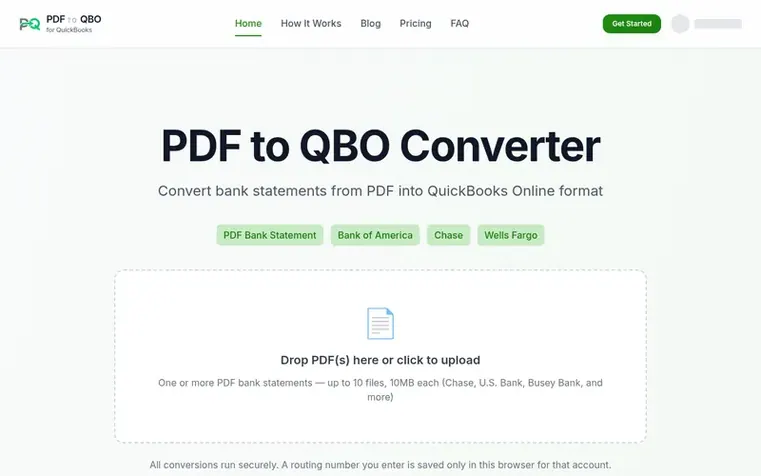
PDF to QBO Converter transforms bank statements from PDF format into the QBO (QuickBooks Online) format that QuickBooks can import directly. Banks typically provide statements as PDFs, but QuickBooks requires structured data — the tool bridges that gap automatically with no manual data entry needed. Users upload their PDF, the tool extracts transactions and generates QBO format, and they can then import it into QuickBooks in seconds.
The converter supports major US banks including Chase, Bank of America, Wells Fargo, and U.S. Bank. It processes conversions securely within the browser, with routing numbers saved only locally. The tool works from any internet-connected device without requiring installation.
Feature summary
- Fast conversion in seconds with no manual data entry
- Secure processing with routing numbers saved only in browser
- Support for major US banks including Chase and U.S. Bank
- Batch conversion of multiple PDF files at once
- Works on desktop, tablet, or phone with no installation required
- Output in standard QBO/OFX format compatible with QuickBooks
- Free trial without credit card required
- Data preview before downloading for review
Pricing
Pricing model: Freemium
Free plan with limited conversions. Starter: $7.50/month or $90/year for 150 conversions per month. Professional: $14.50/month or $174/year for 300 conversions per month. Business: $24.50/month or $294/year for 750 conversions per month. All plans include a 3-day free trial.
Follow PDF to QBO Converter: their milestones, new launches and awards come to you by email, once a day by default.
PDF to QBO Converter metrics
Reported for pdf-to-qbo.com: Ahrefs Domain Rating and Majestic link figures, with the movement since the prior report.
- Domain Rating
- 0
- no change since last check
- Trust Flow
- 0
- no change since last check
- Citation Flow
- 18
- no change since last check
- Referring domains
- 6
- no change since last check
- External backlinks
- 125
- no change since last check
Ahrefs Domain Rating reported 18 Nov 2026, restated 18 Nov 2026. Majestic reported 18 Nov 2026, restated 18 Nov 2026. Link figures sourced from Majestic. Trust Flow, Citation Flow and Topical Trust Flow are trademarks of Majestic-12 Ltd.
PDF to QBO Converter domain summary
Show the domain summary
Read from the public RDAP record on 18 Nov 2026, 07:50 UTC.
- Domain age
- 7 months
- Registered
- Expires
- Registrar
- Cloudflare, Inc.
- DNSSEC
- Not signed
About to launch?
A free checklist for launch day and the week around it, with a list of launch directories.
- Before launch
- Launch day
- That week
- What comes next
Compare and explore
See the alternatives to PDF to QBO Converter, ZeraBooks vs PDF to QBO Converter, 1040kit vs PDF to QBO Converter, BillMyWeek vs PDF to QBO Converter, Point by Tetra M Labs vs PDF to QBO Converter, BillGrid vs PDF to QBO Converter, BankToRows vs PDF to QBO Converter, more in Accounting & invoicing.
Q&A
- What is PDF to QBO Converter?
- PDF to QBO Converter is an online tool that transforms bank statements from PDF format into QBO (QuickBooks Online) format that QuickBooks can import directly. Banks provide statements as PDFs, but QuickBooks requires structured data, and the tool automatically bridges that gap.
- Is there a free plan?
- Yes, there is a free plan with a limited number of conversions per month. No credit card is required to get started, and you can upgrade to Pro or Enterprise plans for more conversions and batch processing.
- Which banks are supported?
- The tool actively supports Chase and U.S. Bank statement PDFs, along with Bank of America and Wells Fargo. Other institutions may work when the PDF layout is compatible, and support for additional banks is added regularly.
- Is my data secure?
- Yes. Conversions are processed securely and PDF files are not sent to third parties. Files are processed for conversion and then deleted, with routing numbers saved only in the browser for that account.
- Can I cancel my subscription anytime?
- Yes. You can cancel your subscription at any time from your account settings. No questions asked, no retention calls.
Leave a review for PDF to QBO Converter
No reviews of PDF to QBO Converter yet. Open the first one. Reviews carry no fee and are never sold.
PDF to QBO Converter has a free listing. The owner can unlock the full profile with a paid launch for $5:
- Founder story (locked)
- Milestones (locked)
- Demo video (locked)
- Dofollow website link: not on this free listing (its website link is nofollow)
Comparables
| # | Sym | Name | Sector | DR chg | Votes |
|---|---|---|---|---|---|
| 1 | Number 1: Point by Tetra M LabsAll-in-one business software connecting sales, inventory, accounting, and customer data for small and growing businessesVerified | Accounting & invoicing | 5 +1 (up) since last check | 6 votes. Log in to endorse Point by Tetra M Labs | |
| 2 | Number 2: Free Check PrintFree online tool to print business checks without software or signupVerified | Accounting & invoicing | 5 no change since last check | 3 votes. Log in to endorse Free Check Print | |
| 3 | Number 3: RiffitWhatsApp invoicing for Indian freelancersVerified | Accounting & invoicing | 3 no change since last check | 3 votes. Log in to endorse Riffit | |
| 4 | Number 4: CleverboekFree accounting software for freelancers and small businesses | Accounting & invoicing | 29 +1 (up) since last check | 1 votes. Log in to endorse Cleverboek |