
Accounting & invoicing
StatementToBooks
Convert PDF bank statements into Excel or CSV transaction tables
- Votes
- 0
- DR (Ahrefs)
- 0 no change since last check
Ahrefs Domain Rating reported 16 Oct 2026, restated 11 Oct 2026.
StatementToBooks metrics
Reported for statementtobooks.com: Ahrefs Domain Rating and Majestic link figures, with the movement since the prior report.
- Domain Rating
- 0
- no change since last check
- Trust Flow
- 0
- no change since last check
- Citation Flow
- 0
- no change since last check
- Referring domains
- 7
- no change since last check
- External backlinks
- 8
- no change since last check
Ahrefs Domain Rating reported 16 Oct 2026, restated 11 Oct 2026. Majestic reported 11 Oct 2026, restated 11 Oct 2026. Link figures sourced from Majestic. Trust Flow, Citation Flow and Topical Trust Flow are trademarks of Majestic-12 Ltd.
StatementToBooks domain summary
Read from the public RDAP record on 16 Oct 2026, 14:21 UTC.
- Domain age
- 2 months
- Registered
- Expires
- Registrar
- Cloudflare, Inc.
- DNSSEC
- Not signed
A service that converts text-based PDF bank statements into Excel or CSV files with extracted transaction data for bookkeeping and accountant handoff.
Overview
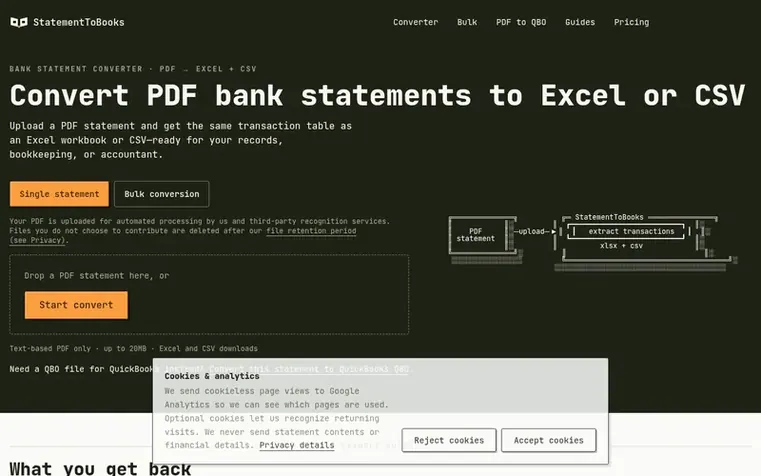
StatementToBooks converts text-based PDF bank statements into Excel or CSV transaction tables. Users upload a PDF statement, and the service automatically extracts transaction data including date, description, amount, running balance (when available), and source page references. The extracted data is available for download as Excel or CSV files, ready for review, record-keeping, or handoff to an accountant.
The service supports single statement conversion and bulk conversion of multiple PDFs. It can also generate QuickBooks Web Connect (QBO) files for direct import into QuickBooks. The converter handles common text-based bank statements but does not support scanned or image-only PDFs, as OCR is not offered. When conversion fails, users receive a specific error reason and the failed conversion does not count against their quota.
Feature summary
- Extract transaction date, description, and amount from text-based PDF statements
- Include running balance when statement prints one
- Source page reference for every transaction row to verify against original PDF
- Download Excel and CSV files
- Bulk conversion of multiple PDF statements
- Convert to QuickBooks Web Connect QBO format
- Clear failure status with specific reason when conversion cannot succeed
- Failed conversions never count against quota
Pricing
Pricing model: Freemium
Free: 10 pages/day, up to 50 pages/month, 5 pages max per file. Starter: $19/mo or $190/yr (billed monthly or annually with 2 months free), 1,000 pages/month, 10 pages max per file. Growth: $29/mo or $290/yr (billed monthly or annually with 2 months free), 2,000 pages/month, 20 pages max per file. B
Q&A
- What fields does the converter extract?
- Each transaction row includes date, description, and amount. When the statement prints a running balance, that is included. Every row carries the source page of the original PDF so you can verify it against the document.
- Does it work with scanned statements?
- No. The current converter is for text-based PDF statements only. Scanned or image-only statements need OCR, which is not offered. Uploading a scan returns a clear failure instead of a guessed table.
- Which banks and languages are supported?
- The converter does not claim to support every bank, language, or layout. It handles common text-based PDF bank statements. If your file cannot be reliably parsed, you get a clear failure status instead of a guessed result, and failed conversions never count against your quota.
- Can I send Excel or CSV to my accountant?
- Yes. Download Excel or CSV and send it together with the original PDF. Your accountant still decides how transactions should be categorized or imported; the converter does not categorize anything.
- What happens if the conversion fails?
- You get a specific reason for the failure—unsupported layout, damaged file, unreadable scan, page limit exceeded, or a system error—never a blank or fake-success file. Failed conversions never count against your quota, and you can retry or send feedback.
Leave a review for StatementToBooks
No reviews of StatementToBooks yet. Open the first one. Reviews carry no fee and are never sold.
StatementToBooks has a free listing. The owner can unlock the full profile with a paid launch for $5:
- Founder story (locked)
- Milestones (locked)
- Demo video (locked)
- Dofollow website link (locked)
Comparables
| # | Sym | Name | Sector | DR chg | Votes |
|---|---|---|---|---|---|
| 1 | Number 1: CleverboekFree accounting software for freelancers and small businesses | Accounting & invoicing | 30 −1 (down) since last check | 1 votes. Log in to endorse Cleverboek | |
| 2 | Number 2: BookfolioUK accounting software for sole traders, landlords and limited companies with accountants on hand | Accounting & invoicing | 34 no change since last check | 0 votes. Log in to endorse Bookfolio | |
| 3 | Number 3: ChargdInvoicing software you buy once and own forever | Accounting & invoicing | 2 +1 (up) since last check | 0 votes. Log in to endorse Chargd | |
| 4 | Number 4: DevInvoiceFree invoice management software built for freelancers and developers | Accounting & invoicing | 0 no change since last check | 0 votes. Log in to endorse DevInvoice |